Essential Concepts In The SRE Roadmap For Maintaining Seamless Website System Uptime

September 30, 2026 · 23 reads
Introduction
A DevOps roadmap shows you the exact path to learn software skills. Starting out feels hard because there are too many tools. So, a clear plan helps you learn one basic skill at a time. You do not need to study everything on day one. First, you master simple computer systems. Then, you learn how to share code with a team. Next, you connect your code to online computers called the cloud. You also learn how to test your code quickly without manual work. Finally, you track errors to keep apps running smoothly for everyone. A clear plan gives you structure, confidence, and real progress.
What Is a DevOps Roadmap?
DevOps connects software builders with computer managers. It helps teams ship good software very fast. A roadmap is a simple step-by-step learning guide. It helps beginners avoid feeling lost or stressed. Many new learners try to learn twenty tools at once. But that mistake wastes time and energy. Instead, you should master basic skills first. Tools change all the time, but basic ideas stay the same. Next, you learn how tools talk to each other. Because strong basics matter most, focus on your hands-on practice every day.
A Simple DevOps Learning Path
You should follow a clear order from simple to advanced steps. First, learn Linux. Linux is an open computer system that runs most internet servers. Next, learn Git to track your code changes. Then, learn networking so computers can talk to each other. After that, explore the cloud, which means rented computers online. Then, learn Docker. Docker packages apps into neat software boxes called containers. Next, set up CI/CD to test and ship code automatically. Then, learn Kubernetes to run many containers together. After that, write code to set up servers. Finally, add monitoring and security to protect your apps.
| Learning Stage | Main Skills | Simple Goal |
| Stage 1: Basics | Linux, Git, Networking | Control computers and track your daily code changes. |
| Stage 2: Packaging | Cloud, Docker, Scripting | Rent servers online and bundle your apps inside containers. |
| Stage 3: Delivery | CI/CD, Kubernetes | Test code automatically and run multiple containers at scale. |
| Stage 4: Control | Monitoring, Security | Watch for system errors and protect your computer files. |
DevOps Engineer Roadmap
A DevOps engineer needs clear steps to build real skills. First, you write short computer scripts to do boring tasks fast. Next, you package apps inside neat containers. Then, you build a delivery line that tests code automatically. You also set up servers with code instead of manual clicks. Finally, you watch your systems so users never see broken pages.
Here is a practical project example. First, write a simple web app. Next, push the app code to Git. Then, write a script to package it in Docker. Next, build a pipeline to test the app on every update. Finally, deploy the app to the cloud and watch it run.
DevOps Tools You Should Understand
Do not feel scared by long lists of tools. You only need to understand the main tool groups.
| Tool Area | Purpose | Example Tools |
| Source Control | Saves and tracks every code edit | Git, GitHub, GitLab |
| Containers | Packs apps into neat software boxes | Docker, Podman |
| CI/CD | Tests and delivers code automatically | Jenkins, GitHub Actions |
| Container Managers | Runs and heals hundreds of containers | Kubernetes, Docker Swarm |
| Infrastructure as Code | Builds servers using text files | Terraform, Ansible |
| Monitoring & Logs | Tracks app health and records errors | Prometheus, Grafana |
| Cloud Services | Rents storage and computing power | AWS, Azure, Google Cloud |
| Security | Checks software for dangerous bugs | SonarQube, Trivy |
| GitOps | Manages server setups straight from Git | ArgoCD, Flux |
DevOps Tools Comparison Made Simple
Beginners often ask which tool is the best one. But no single tool fits every team or project. First, look at the main purpose of the tool. Next, check if it is easy to learn. Then, look at the price and support options. Also, check if it works well with your other tools. A popular tool might cost too much money. Or, it might be too hard for your small team. So, always pick simple tools that match your current needs.
DevOps Certifications Roadmap
Certifications can help you show your technical knowledge. But you should only take tests after you build real projects. First, choose tests that teach practical basics. Next, look at the exam costs and study requirements. Tests cost money and usually expire after three years. So, you must renew them by taking fresh exams. Never trust tests alone to get you a job. Certificates prove you studied, but hands-on lab projects show you can actually build things.
SRE Roadmap
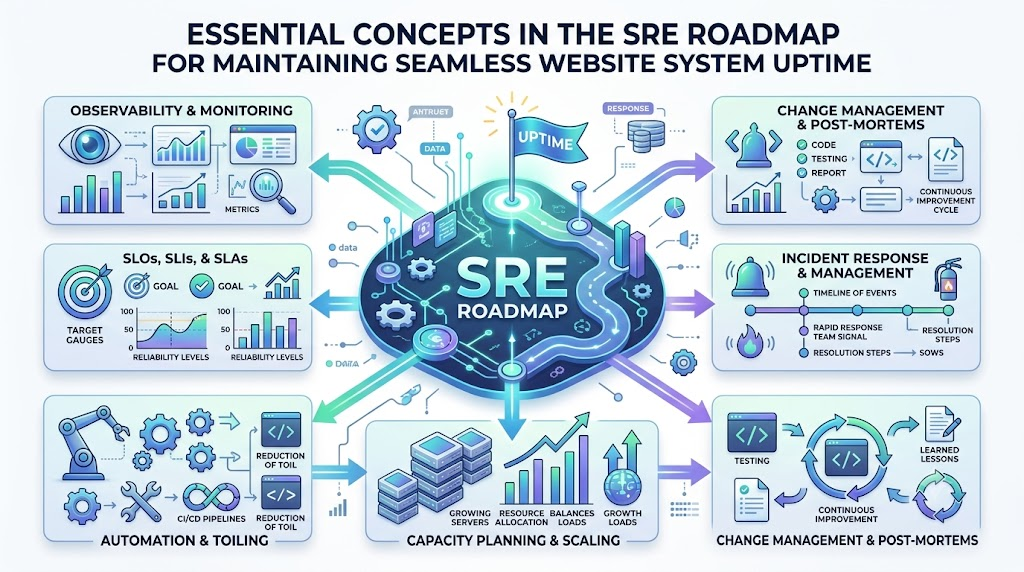
SRE stands for Site Reliability Engineering. SRE engineers make sure big websites never crash. First, you master Linux and computer networks. Next, you learn how to handle server alerts. Then, you write scripts to fix repeated problems automatically. You also plan system capacity so servers handle busy traffic days. DevOps skills give you a great base for SRE work. SRE takes those DevOps basics and adds deep reliability goals.
Platform Engineering Roadmap
Platform engineering helps software builders do their work faster. These engineers create self-service tools for their teammates. First, they build a clean internal website for developers. Next, developers use this portal to launch new apps in seconds. They do not need to ask for manual server setups anymore. For example, think of an internal company store. A developer clicks one button, and the system sets up a secure database automatically.
Real-Life Scenarios
- Slow Manual Releases: A team takes three hours to push code by hand and breaks pages. Next, they learn simple CI/CD steps. Then, they use an automated tool to run tests. Now, code ships safely in five minutes. The lesson is to automate slow manual steps.
- App Crashes on a Server: An app works on a laptop but fails on a live server. So, the engineer learns container packaging. Then, they pack the app inside Docker. The app now runs smoothly everywhere. The lesson is to package dependencies together.
- Lost Server Settings: A computer server crashes, and nobody remembers the setup steps. Next, the engineer learns to write server rules as code. They store the setup text file in Git. Now, they can rebuild servers in minutes. The lesson is to keep setups in code.
Common Mistakes to Avoid
- Skipping the Basics: Learners rush into fancy tools without knowing Linux commands. So, study simple computer commands first.
- Memorizing Too Many Tools: People try to learn every tool at once. Focus on one tool in each category instead.
- Avoiding Real Code: Beginners only watch videos without writing commands. Practice in a terminal every single day.
- Ignoring Computer Networking: New engineers skip how web traffic flows. Spend time learning basic web addresses and ports.
- Relying Only on Tests: Some think a certificate guarantees instant jobs. Build working projects to show real skills.
- Skipping App Security: Teams add security at the very end. Scan your code for bugs right from the start.
- Not Reading Error Logs: Beginners panic when a screen turns red. Read the error line carefully to find the cause.
- Working in Isolation: People try to learn everything alone. Share your notes with online communities to learn faster.
How DevOpsSchool.org Fits Into Your Learning Plan
DevOpsSchool.org is a free, open learning platform for engineers and beginners. It offers structured 90-day learning paths for DevOps, SRE, and platform engineering. You can also explore a large technology directory to study different tools. The platform includes simple labs, tutorials, and a glossary for difficult terms. It also provides clear guides for certifications and interview preparation. These free resources help you follow your roadmap with real confidence.
DevOps Jobs and Career Growth
Many great career paths connect directly to DevOps skills. You can work as a DevOps engineer to automate delivery pipelines. Or, you can become an SRE to keep websites running without downtime. Cloud engineers build and run systems inside rented online data centers. Platform engineers design neat internal portals for fellow developers. DevSecOps engineers scan apps to block dangerous security attacks. You can prepare for these roles by solving real server problems and building your own project portfolio.
Frequently Asked Questions
1. What does a DevOps engineer do every day?
A DevOps engineer helps software teams build, test, and release apps quickly. They write scripts to handle boring tasks. They also set up cloud servers and monitor live systems for errors. Their main goal is to make software delivery safe, fast, and dependable for everyone on the team.
2. Can beginners learn DevOps without a coding degree?
Yes, anyone can learn these skills with steady daily practice. You do not need a computer degree to begin. Start by learning basic Linux commands and simple Git workflows. Then, build small lab projects on your personal computer. Hands-on practice matters much more than any formal college degree.
3. Which programming language should I learn first?
Python is the best first language for most beginners. It uses very clean, simple words that are easy to read. You can write quick scripts in Python to automate daily system tasks. It also works smoothly with almost every major cloud provider and modern server tool.
4. How long does it take to learn DevOps basics?
Most dedicated students need about six months of steady study. You can follow a clear ninety-day plan to learn the main ideas. After that, spend three more months building real projects. Your actual learning speed depends on how much time you practice in your terminal each week.
5. Do I need to buy expensive servers to practice?
No, you do not need to spend lots of money on hardware. You can practice most basics on your own home computer for free. You can install Linux inside a free local virtual box. Most major cloud companies also offer free starter tiers for your initial online tests.
6. What is the difference between Docker and Kubernetes?
Docker is a tool that packages a single app into a neat software box. Kubernetes is a larger tool that manages hundreds of those boxes together. You use Docker first to create your container. Then, you use Kubernetes to run, scale, and heal those containers across many servers.
7. Does a DevOps certification guarantee me a job?
No certification can ever guarantee a paid job. Certificates simply prove that you studied hard and passed a test. Hiring managers care much more about your practical skills. Always build a portfolio of working projects alongside any certification tests you decide to take.
8. What is the main difference between DevOps and SRE?
DevOps focuses on breaking team silos to ship software faster. SRE uses software rules to keep big computer systems reliable and healthy. DevOps shows you how to deliver code quickly. SRE gives you exact tools to make sure that code never breaks the live website.
9. Why is Linux so important for DevOps engineers?
Almost all cloud servers, containers, and internet services run on Linux. If you cannot navigate Linux, you cannot fix broken servers. Learning basic terminal commands lets you edit files, check memory, and manage system rights. It is the core foundation for everything else you will build.
10. How do automated CI/CD pipelines help development teams?
CI/CD pipelines automatically test code whenever a developer saves a change. This automation catches dangerous errors before code reaches real customers. It also saves hours of slow, manual testing. Because the pipeline handles deployments, teams can safely ship new features several times a day.
11. What is Infrastructure as Code in simple terms?
Infrastructure as Code means setting up computers using text files instead of manual clicks. You write down the servers and networks you need in a file. Then, a tool reads the file and builds them automatically. This method makes server setup repeatable, fast, and completely error-free.
12. How should I prepare for my first job interview?
Focus on explaining the real projects you built yourself. Talk about errors you faced and how you fixed them. Be ready to explain basic Linux commands, Git steps, and container basics. Honest answers about your practical troubleshooting will impress hiring teams more than rehearsed theory.
CONCLUSION
Starting your technical journey is exciting when you follow a clear roadmap. Always start with basic skills like Linux, Git, and simple networking. Learn one tool at a time so you never feel overwhelmed. Build small hands-on projects because real practice teaches you best. Do not chase every new tool you see online. Use certifications only to support your hands-on work. Later, you can explore specialized paths like SRE or platform engineering. Keep fixing real problems step by step, and your engineering skills will grow strong.
Leave a Reply