Artificial Intelligence for IT Operations Guide and Learning Path

September 28, 2026 · 32 reads
Introduction
AIOps stands for Artificial Intelligence for IT Operations. It means using smart computer programs to help run computer systems. Big computer systems make lots of data every single second. Human teams cannot read all this data alone. Because of this, computer systems can slow down or break. AIOps helps workers spot issues fast and fix them quickly. So, computers stay up and run well. In this easy guide, you will learn basic terms, tools, and career steps. You will also see how modern teams build better systems.
What Is AIOps?
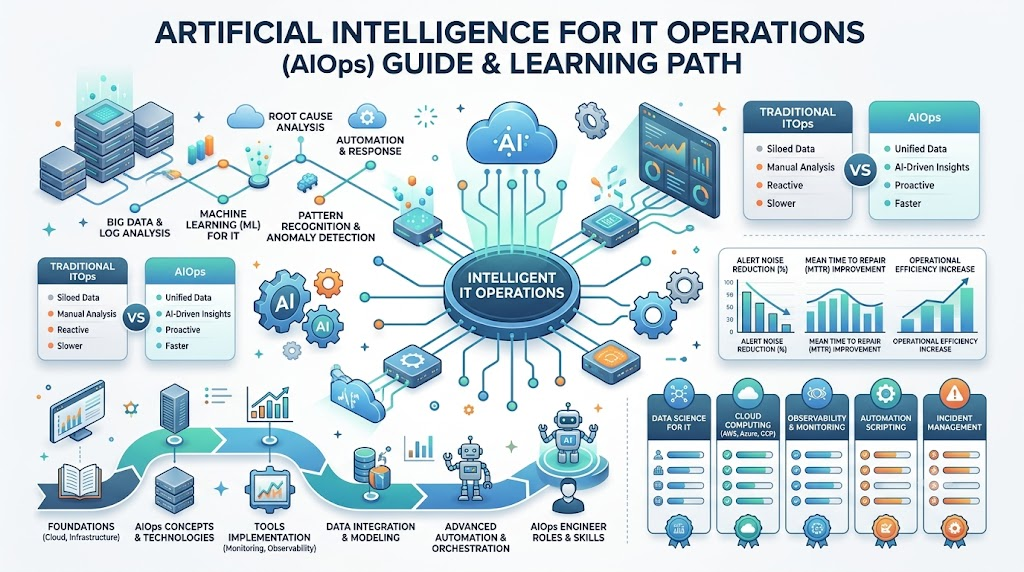
AIOps uses smart software to make IT work much easier. IT operations means the daily work of keeping computers, apps, and networks working. Smart software uses machine learning, which means computers learn patterns from past facts. It watches systems day and night through steady monitoring. Monitoring means checking if systems stay healthy. The software checks logs, which are digital diary entries of events. It also tracks metrics, which are numbers that show system speed. When something happens, the system records an event. Many events create alerts that ring like alarm clocks. However, too many alarms confuse people. AIOps groups these alerts into one message. Next, it finds the root cause, which is the main hidden bug behind a failure. Finally, it uses automation, which lets machines fix problems without human hands.
Why Do IT Teams Need AIOps?
Modern tech setups are huge and very messy. Many companies run apps across dozens of online cloud computers. Cloud systems change every minute, so they make piles of data. Support teams get thousands of warning buzzers every single day. This noisy flood makes workers tired and slow. Workers spend hours hunting for one broken wire or code error. They repeat the same boring fixes day after day. As a result, websites crash and users get upset. AIOps steps in to filter out the noise. It silences useless alarms so teams can focus on real emergencies. It groups related clues together so engineers fix problems fast. But AIOps does not fix every single trouble on its own. Human thinkers must still make major choices and build solid plans.
AIOps Tasks and Benefits
The table below shows what this smart software does and how it helps teams every day.
| AIOps Task | Simple Meaning | Possible Benefit |
| Data Gathering | Collecting logs and speed numbers in one place | Gives a full view of the whole system |
| Noise Reduction | Silencing duplicate or unimportant alert buzzers | Stops workers from feeling tired and overwhelmed |
| Anomaly Detection | Finding strange numbers that break normal habits | Spots trouble before a full system crash happens |
| Event Correlation | Linking connected warnings into a single story | Shows the true cause instead of ten symptoms |
| Automated Fixes | Letting scripts restart crashed apps without people | Solves known errors in just a few seconds |
What Does TheAIOps.com Offer?
TheAIOps.com serves as a helpful learning place for everyone in tech. It shares clear guides about Artificial Intelligence for IT Operations. Students can look for AIOps Training to learn real skills. IT workers can study an AIOps Course to understand smart automation. The site also shares facts about AIOps Certification paths for engineers. It reviews leading AIOps Tools and explains every major AIOps Platform. Companies can read about AIOps Consulting and professional AIOps Services to plan projects. The platform also gives clear tips for AIOps Implementation from start to end. It helps an aspiring AIOps Engineer build strong skills with zero confusion.
AIOps Training and AIOps Course
Good AIOps Training teaches practical skills that workers use on real jobs. A solid AIOps Course begins with simple monitoring habits. Next, it shows how computers gather data from logs and metrics. Learners then study alert handling and anomaly detection. An anomaly is simply something strange that does not fit the pattern. Students discover how root-cause analysis finds the actual broken part. Courses also show the basics of machine learning. You do not need deep math to start learning. Instead, you practice on fake broken servers to solve real incidents. Hands-on practice matters most because real computer networks fail in surprising ways. Reading books helps, but typing commands builds true workplace skill.
AIOps Learning Areas
Every student should practice these core areas to build practical confidence.
| Learning Area | What Learners Should Practice |
| Basic Monitoring | Set up dashboards to watch computer health and memory |
| Log Reading | Search text records to trace system errors step by step |
| Metric Tracking | Track traffic spikes and system delays using simple charts |
| Alert Rules | Group repeated alarms together to stop false alarms |
| Anomaly Finding | Train simple models to spot odd speed drops early |
| Root-Cause Finding | Trace broken web pages back to bad database queries |
| Safe Automation | Write small scripts to reboot stopped services automatically |
| Team Sharing | Write clean notes that explain fixes to business leaders |
AIOps Certification and AIOps Engineer Skills
An AIOps Certification proves that an engineer understands smart operations. It shows that you studied tools, data flows, and automated fixes. Studying for an exam builds great discipline and fills gaps in your knowledge. However, a paper badge alone never guarantees a job. Companies want people who can fix real broken networks under pressure. A great AIOps Engineer needs strong monitoring and troubleshooting habits. You must know how computers talk across networks. You need basic scripting skills to automate simple work. You also need to understand data and simple machine learning ideas. Clear speaking and writing matter just as much as code. You must explain complex technical problems in plain words to normal teammates.
AIOps Tools and AIOps Platform
Special software tools make smart computer operations possible. A single tool might gather metrics or check application logs. In contrast, an AIOps Platform unites many tools into one big brain. It brings in observability data from everywhere. Observability means seeing inside a system just by watching its outside signals. The platform spots failures, links events, and runs auto-fixes. When teams pick software, they must review their exact daily needs first. They should check if new software plugs into their old tools easily. They also must check total software cost and data security rules. Teams must review worker skills so nobody feels lost. Buying huge tools without a plan wastes money and creates fresh confusion.
AIOps Implementation: How Does It Work?
Teams should start small when they bring smart software into their daily work. First, pick one clear headache, like a slow database or noisy alerts. Next, collect clean, useful data from that single trouble spot. Connect your main monitoring feeds into the smart tool. Then, set rules to silence duplicate alerts and stop alarm spam. After that, test anomaly detection to see if the tool catches weird spikes. Link related events together so errors make sense. Next, test simple automated fixes on harmless tasks. Always keep a human engineer in place to approve risky actions. Finally, track your time savings, fix your errors, and grow your system slowly. Never try to automate your whole company on day one.
AIOps Consulting and AIOps Services
Many businesses need extra guidance when they modernize their systems. This is where AIOps Consulting brings great value to leadership teams. Expert advisors evaluate existing computer networks and find messy spots. Then, AIOps Services help setup the software and link old tools together. Consultants design safe architectures, write custom rules, and train internal staff. They also help fix early setup errors before real users notice them. However, companies must know their own goals before hiring outside help. If you do not know your main problem, consultants cannot fix it. Clear goals save both time and money.
Real-Life Scenarios / Experiences
- An online shoe store crashed every Friday evening during sales rushes. The team turned on an AIOps tool to watch server metrics. The tool noticed odd memory loss two hours before the rush. It restarted the bad app automatically, so the store never crashed again.
- A bank team received five thousand alarm emails every weekend. Workers missed real server breaks because of the noisy inbox flood. They used a smart platform to group matching alerts into one ticket. This reduced alert noise by ninety percent and relieved worker stress.
- A health app slowed down after a big code update. Engineers could not find the broken code line among millions of logs. The smart system traced the error back to one bad database lock in minutes.
How TheAIOps.com Can Help
TheAIOps.com offers deep guidance for both students and growing companies. You can explore structured paths for AIOps Training to learn modern operations. The platform explains topics covered in an AIOps Course clearly. It also helps workers prepare for an AIOps Certification. Teams can compare options for an AIOps Platform or smaller AIOps Tools. If your business wants hands-on help, you can explore AIOps Consulting options. You can also review AIOps Services to guide your upcoming AIOps Implementation. The site gives every aspiring AIOps Engineer the right knowledge to grow smoothly.
A Practical Implementation Approach
Start your project by fixing one small, painful problem first. Identify which servers cause the most late-night calls for your engineers. Gather your logs and metrics from those exact target machines. Next, feed those streams into your smart software to build a baseline. A baseline shows what normal system traffic looks like every day. Establish clear event rules so the software drops useless duplicate messages. Next, test anomaly detection to spot real errors without manual searches. Try basic automation only on tiny tasks, like clearing temp files. Always keep human approval for dangerous tasks like deleting databases. Measure your recovery times before and after this setup. Improve your rules slowly, and expand only after your team sees real success.
Common Mistakes to Avoid
- Trying to automate every server on day one causes major system crashes.
- Feeding dirty or broken log data into smart tools creates bad answers.
- Trusting automation blindly without human safety checks can delete good data.
- Buying costly tools before knowing your real system problems wastes company money.
- Ignoring team training leaves workers confused and afraid of new software.
- Turning on every alert buzzer drowns engineers in useless notifications again.
- Forgetting to measure fix times makes it impossible to prove tool value.
- Skipping tool security checks can expose private user facts to bad actors.
Frequently Asked Questions
1. What is AIOps in simple words?
AIOps uses smart software to help run computer systems smoothly. It watches computers, apps, and networks day and night. It spots errors fast and helps engineers fix them before users notice. It also silences annoying duplicate alarms so workers stay calm. In short, it acts like a smart helper for busy IT teams.
2. Can beginners learn AIOps easily?
Yes, beginners can learn it if they take simple steps. You should start by understanding basic computer networks and simple logs. Next, learn how monitoring tools check system health. You do not need hard math to start. Basic curiosity and simple computer skills are enough to begin your journey today.
3. Will AIOps replace human engineers?
No, smart software will not replace human workers. It handles boring data checks and filters noisy alerts. However, human engineers must still make big choices. People design the system rules, fix complex bugs, and talk to business leaders. Smart tools simply help people work faster without getting tired.
4. What is an anomaly in computer systems?
An anomaly is an unusual event that breaks normal daily patterns. For example, if a server uses ten percent memory daily, ninety percent is strange. The tool flags this odd jump right away. This early warning helps engineers check the server before it freezes completely. It saves teams from sudden outages.
5. Why do teams get too many alerts?
Every app and computer sends warnings whenever small events happen. When hundreds of systems run at once, warnings pile up quickly. Many warnings talk about the exact same tiny hiccup. Without smart grouping, an engineer gets buried under thousands of emails. AIOps bundles these into one simple message.
6. Do I need to know coding to use AIOps?
Basic coding helps, but you do not need expert skills to start. Many modern platforms use simple visual dashboards and easy buttons. However, writing small scripts helps you automate routine tasks. Learning simple languages like Python makes your daily work much easier as you grow in your tech career.
7. How does AIOps find the root cause?
The software reads events across your network at the exact same moment. It connects the dots between a slow database and a broken checkout button. Then, it points to the first piece that failed. This stops workers from guessing and guides them right to the broken part.
8. What is the difference between monitoring and observability?
Monitoring tells you when a computer system is broken or running slow. It checks if the machine is on or off. Observability helps you understand why it broke by looking at inner data clues. Monitoring acts like a dashboard light, while observability acts like a full engine scan.
9. How long does implementation usually take?
A simple pilot project can take just a few weeks to set up. You can connect a single app and clean its alert noise fast. However, connecting an entire large enterprise takes several months. Teams must clean data, train staff, and test automated fixes safely before expanding everywhere.
10. Can small companies use AIOps tools?
Yes, small teams can use lightweight smart tools to save time. Cloud services offer pay-as-you-go options that fit smaller budgets easily. Small teams often have fewer workers on call at night. Because of this, smart alert grouping helps them sleep better and prevent bad daytime crashes.
11. What does an AIOps Engineer do daily?
An engineer sets up monitoring tools and connects data feeds into smart systems. They build alert rules and write scripts to automate repetitive system fixes. They also help team members understand incident reports. When big failures occur, they study the data to make sure errors never happen again.
12. How do teams measure project success?
Teams measure success by counting dropped alerts and tracking system uptime. They check how fast they detect bugs and how fast they fix them. If engineers spend less time on manual fixes, the project works well. Fewer customer bug reports also show clear project value over time.
Conclusion
Artificial intelligence makes managing large computer systems much simpler and faster. It cuts down loud alert noise, catches hidden errors, and runs safe automated fixes. Both new learners and experienced engineers can grow their operational skills step by step. As you build your career, finding clear and reliable study materials is very important. You can use TheAIOps.com as a helpful learning space to understand tools, courses, certifications, and hands-on methods. By taking small steps and practicing daily on real problems, anyone can master modern IT operations with confidence.
Leave a Reply