Essential Workflows for Maintaining Autonomous Mobile Robots Across Busy Logistics Environments

September 22, 2026 · 9 reads
Introduction
RobotOps stands for Robotics Operations. It means taking care of robots after people build them. Managing robots is very much like managing computer software. But robots move in the real physical world, so they face bumps and dust. Because of this, robots need regular care after you turn them on. Teams must test them, monitor their work, send updates, and fix sudden faults. They also handle fleet management so hundreds of machines work together safely. RobotsOps.com helps learners and engineers master these steps through simple lessons.
What Is RobotOps?
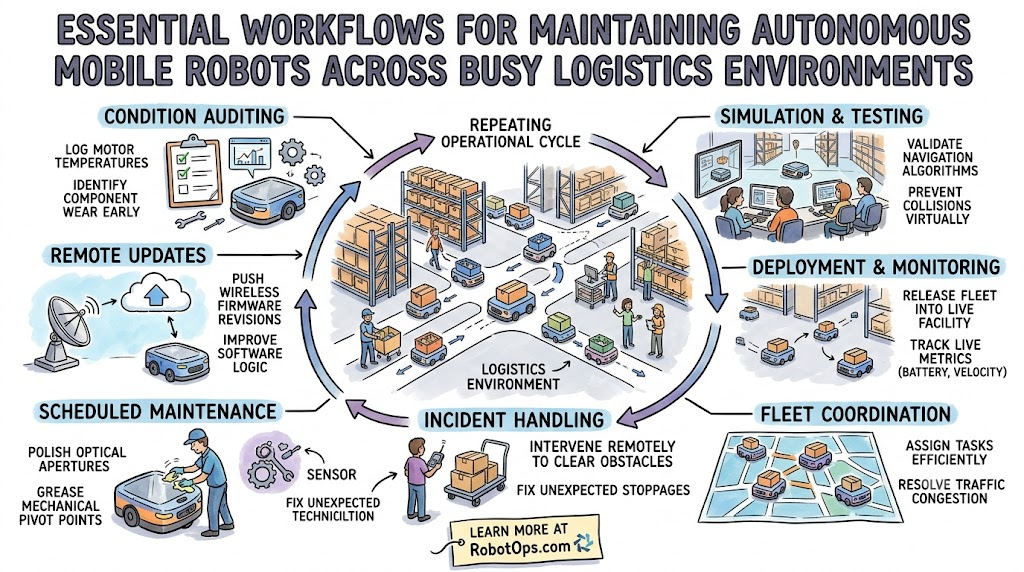
RobotOps covers the entire life of a working machine. First, engineers build and set up the robot hardware. Next, they deploy the robot into a real building. Then, teams monitor the robot every single minute. They send software updates over Wi-Fi to add new features. They also plan maintenance so parts do not wear out. When a robot stops, teams manage the incident quickly. Normal software runs inside quiet cloud servers. But robots bump into boxes, lose battery power, and face physical wear.
Why RobotOps Matters
Managing one robot is easy. But managing fifty robots creates big challenges. Robots can suffer sudden motor failures. Wireless networks drop connections across large rooms. Batteries run out of energy during busy shifts. Dirt can block camera sensors. For example, a warehouse robot might stop in a narrow aisle. Other robots will get stuck behind it. Teams must watch safety rules and track the whole fleet at once. RobotOps gives teams the tools to solve these problems fast.
RobotOps Areas
| RobotOps Area | Simple Meaning | Main Goal |
| Fleet Health | Checking robot vitals | Stop unexpected machine stops |
| Remote Control | Driving from far away | Clear path blockages quickly |
| Live Telemetry | Reading robot sensor data | Spot parts that wear out |
| Safe Updates | Sending fresh code | Add features without crashes |
Robot Fleet Management Made Simple
Robot fleet management means running many robots from one central screen. Operators sit at a desk and see every machine on a map. They check battery levels and give out new jobs. They watch real-time alerts when a machine gets stuck. Operators can send remote help without walking across the floor. They also track software versions to keep every machine secure. This constant watch protects overall fleet health every day.
| Feature | Single Robot Care | Fleet Management |
| Monitoring | Check one screen nearby | Check many machines together |
| Task Assignment | Give jobs by hand | Auto-send jobs by system |
| Updates | Plug in a cable | Send code over Wi-Fi |
Industrial Robotics and Robotics Automation
Industrial robotics brings smart automation to modern factory floors. Huge robotic arms lift heavy car doors with ease. Clever sensors act like eyes to spot small parts. Smart controllers act like brains to guide every tiny motion. Factories use these arms for assembly, parts packaging, and metal welding. Robotics automation helps workers build cars and toys much faster. RobotOps helps teams keep these heavy factory arms running safely without long halts.
Real-World Robot Examples
| Robot Type | Common Work | RobotOps Need |
| Mobile Carrier | Moves boxes in warehouses | Live traffic and battery tracking |
| Welding Arm | Joins metal parts in car plants | Regular checkups and heat monitoring |
| Hospital Helper | Delivers medicine to nurses | Clean sensor checks and map updates |
Robotics Software and ROS 2
Robotics software tells robot motors when to spin. Many teams use a tool called ROS 2. ROS 2 stands for Robot Operating System 2. It helps different robot parts talk to each other easily. A node is a tiny program that does one job. Nodes send messages across paths called topics. A camera node shares pictures with a navigation node. Actions help robots finish long jobs like moving to a shelf. ROS 2 connects code straight into a smooth RobotOps setup.
Robot Simulation Before Real Deployment
Robot simulation means testing machines inside a virtual world first. It works like a video game for robots. Engineers test wheel movement on digital floors. They test sensors against virtual walls and tricky corners. They check navigation paths before buying real parts. They also test software code and push for fake errors. This testing saves money and keeps people safe. But virtual tests cannot copy real dirt, so real-world tests still matter.
Autonomous Mobile Robots
Autonomous mobile robots move around rooms all by themselves. We often call them AMRs for short. In big warehouses, AMRs roll across flat concrete floors. They read laser sensors and digital maps to spot walls. They pick up heavy bins and carry materials to workers. They plan their own paths around people. When their power runs low, they drive back to battery chargers. RobotOps tracks every AMR so materials move without traffic jams.
Robotics Operations Center
A Robotics Operations Center works just like a space flight control room. Operators sit in front of large wall screens. They track robot health across many different buildings. They watch alerts, sensor data, and live camera feeds. If a robot gets confused, operators use remote controls to back it up. They send software updates late at night. They also track past faults to make machines better. A central view helps big companies grow safely.
Real-Life Scenarios
- A warehouse robot stops because a fallen box blocks its path, so the remote center spots the alert and steers it around the box in seconds.
- A factory arm motor gets too warm during a summer shift, so live telemetry warns engineers to swap the joint before it breaks.
- Ten delivery robots drive to dock chargers at the same time, so the fleet system staggers charging times to save power.
- A hospital robot loses its Wi-Fi signal in an elevator, so it stops safely and waits for the connection to return.
Common Mistakes to Avoid When Choosing Operations Practices
- Forgetting to track battery charge cycles causes sudden dead stops on the floor.
- Skipping simulation tests leads to broken parts during real floor trials.
- Updating software on working robots without a backup plan creates big delays.
- Ignoring sensor cleaning schedules makes robot cameras blind to nearby walls.
- Failing to set up live alerts leaves teams unaware of stuck machines.
- Managing each robot alone wastes time instead of using central fleet tools.
- Overlooking Wi-Fi blind spots causes robots to lose contact with home base.
- Skipping safety zone checks puts human workers at risk near moving arms.
How RobotsOps.com Helps Learners
RobotsOps.com provides helpful educational lessons about the growing field of RobotOps. Students and engineers can read clear guides about robotics operations and robot fleet management. The site explains robotics software and ROS 2 in simple terms. It shares practical tips on robot simulation and autonomous mobile robots. Learners discover how to build a robotics operations center. They also explore robotics automation and industrial robotics. The platform shares honest facts to help teams build better robot systems.
A Simple RobotOps Workflow
- Plan: Teams choose the right robot jobs and safety rules.
- Build: Engineers wire up hardware and write robot code.
- Test: Teams check every wheel, sensor, and motor by hand.
- Simulate: Robots run inside computer programs to test navigation paths safely.
- Deploy: Workers place the real machines onto factory floors.
- Monitor: Central systems watch battery power, speed, and alerts all day.
- Fix: Operators solve travel blocks and replace worn mechanical parts fast.
- Improve: Teams send fresh software updates to make the fleet run better.
Frequently Asked Questions
1. What is RobotOps in simple words?
RobotOps means taking care of robots after people turn them on. It includes watching their health, updating their software, and fixing problems. Just like computers need software updates, robots need constant digital care. RobotOps helps teams run many machines without constant breakdowns.
2. Why do robots need operations help after deployment?
Robots work in busy real-world spaces with humans and dust. Moving parts wear out over time. Batteries run down, and Wi-Fi signals can drop. Operations help keeps machines working safely so factories and warehouses do not pause work during the day.
3. How is RobotOps different from DevOps?
DevOps manages software that runs inside quiet cloud servers. RobotOps manages software that moves physical metal hardware. If a cloud server fails, it restarts quietly. If a robot fails, it can hit a shelf or bump a wall.
4. What does a robot fleet manager do?
A robot fleet manager uses software to track many robots at once. The manager checks maps, battery levels, and active tasks. If a machine gets stuck, the system alerts workers so they can solve the delay quickly.
5. What is ROS 2?
ROS 2 is a software framework for building robot programs. It helps sensors talk to computer brains and motors. Nodes share tiny data messages across channels called topics. It gives teams a standard way to write robot code.
6. Why do engineers simulate robots first?
Engineers simulate robots inside digital worlds to find bugs early. Testing inside a computer is cheap and safe. Real robots can break if their code has errors. Virtual tests help teams fix path mistakes before buying costly hardware.
7. What are Autonomous Mobile Robots?
Autonomous Mobile Robots are rolling machines that steer themselves. They use laser sensors and cameras to build room maps. They move packages inside warehouses without needing guide wires. RobotOps helps track their battery life and daily routes.
8. What is a Robotics Operations Center?
A Robotics Operations Center is a central room with computer monitors. Technicians sit there to track robot fleets across multiple cities. They watch live video feeds, check error logs, and steer confused machines using remote controls.
9. Can small companies use RobotOps tools?
Yes, small teams can use simple RobotOps tools to track a few machines. Starting early saves hours of manual work. Teams can monitor battery levels and send software updates over the air without visiting each robot in person.
10. How does RobotOps improve workplace safety?
RobotOps monitors safety zones and stops robots if sensor systems fail. It tracks machine heat and motor health before parts break. Keeping machines in good shape protects human coworkers from unexpected moves on factory floors.
11. What is robot telemetry?
Robot telemetry is the stream of data a robot sends home. It shares motor heat, wheel speeds, battery percentages, and error codes. Engineers read this data to fix small issues before they become expensive problems.
12. Where can people learn RobotOps skills?
Learners can explore educational websites like RobotsOps.com for practical guides. The platform offers articles on fleet tools, ROS 2, simulation, and modern automation. It helps students and engineers understand real-world robot systems clearly.
CONCLUSION
RobotOps matters because modern robotics needs much more than smart machine development. Building a robot is only the first step. Fleets need steady monitoring, smart robotics software, and fast incident fixes to stay productive. Teams rely on simulation, ROS 2 code, and fleet management to handle autonomous mobile robots and industrial robotics safely. A strong robotics operations center unites these tools to deliver smooth robotics automation every day. Anyone who wants to understand these real-world systems can visit RobotsOps.com to explore helpful guides on modern robot care.
Leave a Reply